Save TikTok videos without the watermark
Paste a TikTok link below and tap Download. Douyin, Facebook and Instagram links work too.
- Free, no account needed
- Your videos are never stored
- Works on phones and computers
No sign-up, no fee — and we never keep a copy of your video.
Tick the box below to go on
Save a TikTok video in three steps
Get the post link
In TikTok, tap the share arrow beside the video, then the round chain-link button. On tiktok.com, open the video on its own page and copy the address bar.
Paste it in the box above
Tap Paste, or press and hold the box and choose Paste. Then tap Download. TikGo looks the post up and shows a result card.
Pick a version
Tap the version you want, usually No watermark. The file only starts coming in at this step.
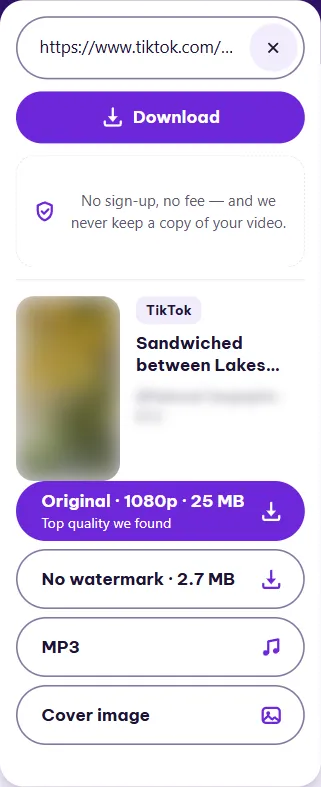
What the result card gives you
Every video post gets a No watermark button. It is the clip TikTok streams to viewers, minus the moving logo and the account name that TikTok stamps on its own downloads. Above it, TikGo may show Original, labelled “Top quality we found”: a higher-quality copy of the same video, when TikTok has one.
Is the original worth the bigger file? It depends on the post. When we tested on 17 November, one No watermark file came out at 576x1024 and 2.7 MB, while the original of the same clip was 1080x1920 and 25 MB. For a quick share in a chat, No watermark is plenty. For editing or a big screen, take the original.
Some posts have no separate original. You see “Checking the original…” for a moment, then the button goes away and only No watermark is left. That happened to one of the four videos in the table below. One original came back in HEVC, a codec some older phones and editors can’t open, so keep the No watermark file as a fallback.
| Type | Quality | Size | Notes |
|---|---|---|---|
| No watermark | 576x1024 | 2.7 MB | h264 |
| Original | 1080x1920 | 25 MB | h264 |
| No watermark | 576x1024 | 2.6 MB | h264 · This post has no separate original |
| No watermark | 720x1280 | 11 MB | h264 |
| Original | 1080x1920 | 68 MB | h264 |
| No watermark | 720x1280 | 2.2 MB | h264 |
| Original | 1080x1920 | 8.4 MB | hevc · This original is HEVC (H.265), and some older devices can't play it |
Measured November 17, 2026 on Windows PC · How we test ›
The Original button does not always behave the same way. Depending on where you’re visiting from and how the site is set up, it either saves the file here or opens a separate site run by the same operator. Its label tells you which, and No watermark saves here either way.
Where the video goes on your device
Your phone or browser decides that, not TikGo. Every file name starts with “TikGo -”, so searching for that word finds your saves later. On a computer, the file goes to the browser’s usual Downloads folder; in Chrome on Windows, Ctrl+J lists it. On phones, the route into Photos or Gallery differs between iPhone and Android, and our guide to saving videos to your phone walks through both with screenshots.
Photo slideshows and MP3 sound
TikTok photo posts, the swipeable slideshows with music, get a different card. Instead of video buttons it shows the photos, a Save all button with the photo count, a button for each single photo, and usually Sound (MP3) for the track. We have not run a photo post through our measurements yet, so we can’t share sizes for those.
For a regular video, the MP3 button, when it is there, saves just the audio, which is handy for a voice-over or a song you want to find again. Cover image saves the still frame TikTok shows before the video plays. If MP3 is having a slow moment, the card says so, and video buttons keep working.
Daily limits and file size
Each internet connection gets 50 lookups a day, and the count starts over at 00:00 UTC. A lookup is one tap on Download that finds a post; the limit message calls them free links. Saving the versions on that card adds nothing to the count. Failed lookups don’t count either, with rare exceptions: mainly a post that turns out to be private or deleted, and a Facebook or Instagram post that has a video but no single file with both picture and sound.
A single file can be up to 1 GiB. Anything larger shows a message that the file is too big; the No watermark version of that video still works. A result card stays usable for 30 minutes, and after that TikGo asks you to tap Download again.
Questions
Can I save a TikTok LIVE?
No. A LIVE is not a single post, so TikGo has nothing to save while it streams. If the creator later posts a clip from it, use that post's link.
The original won't play on my older phone. What now?
That original is probably HEVC, also called H.265. The measurement table on this page marks such files. Save the No watermark version instead. Every TikTok No watermark file we measured was H.264, which nearly any device plays.
Can I get a video that was deleted from TikTok?
No. Once a post is removed or made private, TikGo can't reach it and shows that the post is private or no longer exists. That attempt does use a lookup.
Can I paste several links at once?
No, the box takes one link per lookup. Links you have used appear under Your recent links, kept on this device only, so you can look one up again later.
Does TikGo keep the videos I download?
No. The file reaches your device, sometimes through a relay server, and we do not store a copy on our side.